1. Appointments & Reception
Book appointments, record arrival and check-in, and hand patients over to the clinician. The waiting display follows statuses recorded by staff.
Learn more about scheduling →

Connect appointments, reception queues, patient records, prescriptions and invoices in one Arabic and English workspace for clinics in Egypt and MENA.
Use ClinBeam in Arabic or English and choose EGP, USD, SAR, or AED as the clinic currency. Available features depend on the plan, setup, and staff permissions.
Book appointments, record arrival and check-in, and hand patients over to the clinician. The waiting display follows statuses recorded by staff.
Learn more about scheduling →Keep medical history, visit notes, diagnoses, vital signs, prescriptions, and uploaded documents together in the patient record.
Learn more about EMR →Record tooth findings and procedures, organize treatment stages, and follow progress. Staff can send completed procedures to billing when enabled.
Learn more about dental charting →Issue invoices in the clinic currency: EGP, USD, SAR, or AED. Track treatment-plan installments and patient payments.
Learn more about billing →Track supplies, quantities, batches, and recorded expiry dates. Review low-stock items, counts, and transfers within the clinic.
Learn more about inventory →Manage branch details, switch between authorized clinics, and tailor Staff permissions for reception, nursing, cashier, and inventory duties.
Learn more about multi-branch →Compare the published plan with your actual reception, clinical and cashier workflow. These are the details to confirm during your ClinBeam demo.
See the published plans, billing period and included limits on the pricing page. Ask about setup, data migration and messaging-provider charges before agreeing. Patient invoice currency is separate from your clinic subscription.
Review current plansThe team reviews your request and provisions the workspace. Configure individual staff access, regional settings, services and schedules, then rehearse a fictional visit. Agree supported import formats, required fields, attachments, costs and responsibilities before moving real records; migration is not automatically guaranteed.
See the first-day setup checklistOur public guides show real ClinBeam screens with fictional training records, expected outcomes and troubleshooting. Use the demo to verify that reception, clinicians and cashiers can finish their own tasks with appropriate permissions.
Follow a reception workflowAvailable modules depend on the plan, specialty, enabled features and staff permissions. Messaging needs a configured provider. ClinBeam runs in a browser; confirm connectivity needs and avoid assuming every task works offline. Subscription payment and activation are handled manually.
Check features and requirements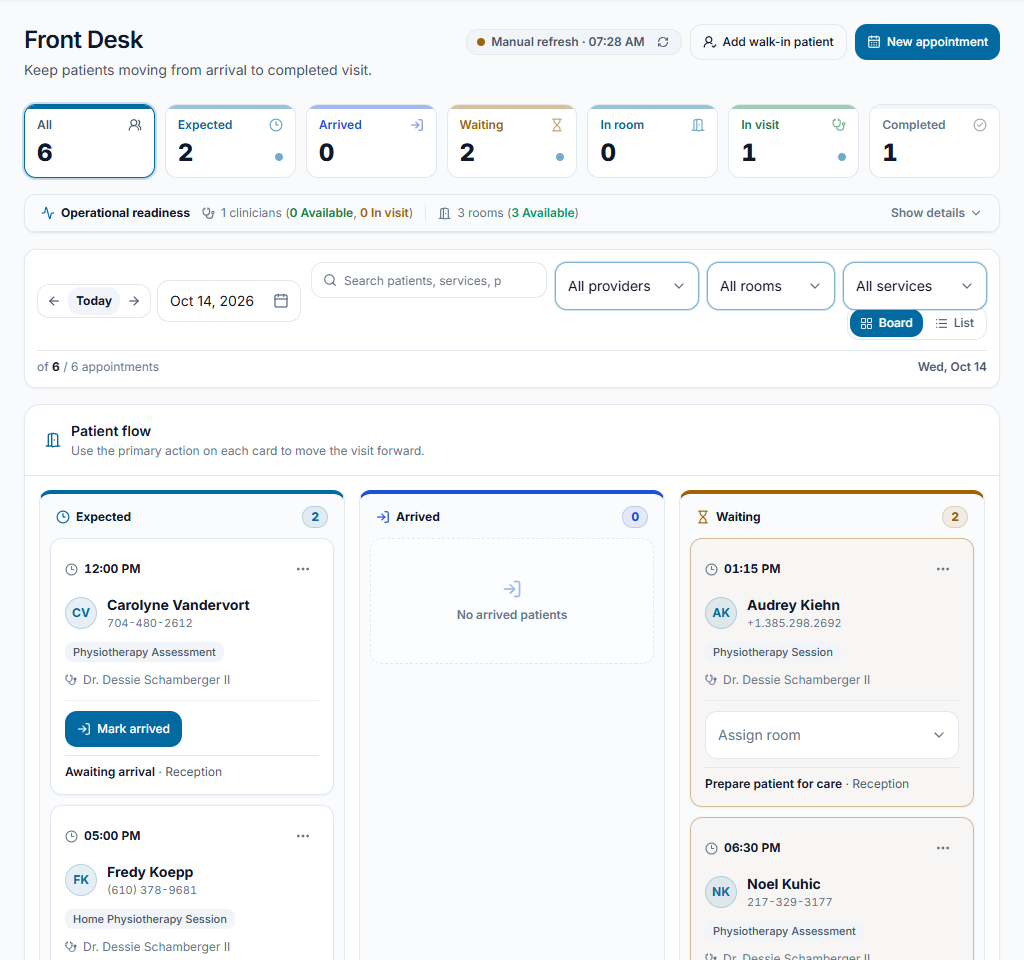
ClinBeam connects appointments, reception, patient records, prescriptions, invoices and inventory in Arabic and English. EGP is available as a clinic currency; features depend on the plan, setup and staff permissions.
The pricing page lists currently published plans. Request a private 14-day trial without payment details; our team reviews the request and confirms setup and access. The trial is temporary, not a permanently free plan. Subscription payment and activation are confirmed manually.
Record tooth findings and procedures on the chart, organize treatment stages and follow planned and completed work. Billing and feature availability depend on setup and staff permissions.
Patient records, medical images, consent forms, treatment plans, appointments and invoices can support the workflow. Discuss session documentation and the features available for your specialty before subscribing.
ClinBeam works in your browser. Messaging reminders require the feature to be enabled and a provider to be configured; confirm available channels and charges with our team. Do not assume every clinic task works without an internet connection.
Records belong to the selected clinic and access depends on roles and permissions. Before entering real patient data, agree on hosting, file protection, backup timing, retention and recovery arrangements.